
VIP member
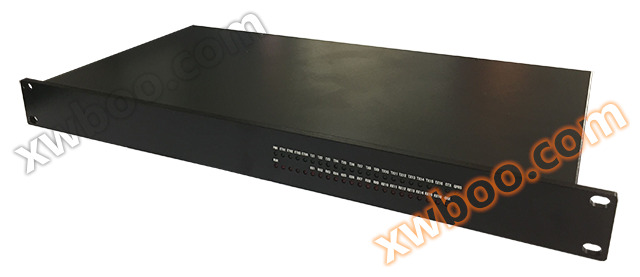
QT251 (16 serial ports and 4 network ports)
QT251 Product Specification 1. Product Overview QT251N is an embedded computer based on a high-performance 32-bit MPU with a Reduced Instruction Set (
Product details
QT251 Product Specification
1、 Product Overview
QT251N is a high-performance 32-bit MPU embedded computer based on the Reduced Instruction Set (RISC) architecture. This CPU is a system level single-chip with ARM Cortex-A8 as the core, built-in NEON single instruction stream majority (SIMD) co processing, 256KBL2 cache with error correction code (ECC), and supports up to 1GHz frequency. The system provides RS485/RS232 communication, wired network communication, CAN bus, and optional wireless GPRS communication. It has the characteristics of small size, low power consumption, and high efficiency, and is suitable for power concentrators HMI、 Industrial control, gateway and other occasions.

2、 Product Features
1. Hardware characteristics
AM355xCPU:
32bit ARMCorte-A8 architecture, with a main frequency of 800MHz, 1.6MIPS/MHz, and a maximum main frequency of 1GHz
32KBI cache, 32KBD cache, NeonSIMD coprocessor
Memory:
512MbyteDDR3, 64KB dedicated RAM
FLASH:
512MbyteNANDFlash, Maximum support for 8Gbyte
Supports FLASH such as NAND, NOR, SRAM, etc
Encryption:
Support PRNG/DES/3DES/AES/SHA/HMAC encryption, up to 256 bit encryption mode
watchdog:
Built in WDT, overflow time less than 60 seconds, supports idle wake-up and power down wake-up
RTC:
High precision real-time clock with built-in power supply battery
Debugging port:
One serial port is the system console port. Baud rate: 115200, data bits: 8, stop bit: 1, checksum: none, flow control: none
RS485/RS232:
8-way independent RS485 communication, internal fully isolated protection design
8-channel RS485/RS232 time-division multiplexing communication, can be selected and used according to actual needs, with internal fully isolated protection design
B-code timing:
1 RS485 receiver, dedicated for B-code timing, automatically timing after connection
CAN:
1-channel CAN communication, built-in isolation protection design
Switching output input:
2-channel dual pole double throw relay output
2-channel switch input
Network:
4-channel 10M/100M adaptive industrial Ethernet, standard RJ45 interface
15KV TVS protection, internal fully isolated protection design
Wireless function (optional):
RF band 800/900/1800/1900MHz (optional 2/3/4G)
Optional WIFI: Can connect to AP, can also be used as AP
1 SIM card interface, 1 antenna interface
Transmission speed: reaching the standard speed for the corresponding function
SDCARD:
Built in SD/MMC card interface
power supply
Input voltage: 220V, supports AC and DC
Single machine power consumption:<12W
mechanical properties
Metal material of shell
Size: 1U
Protection level: IP63
working environment
Working temperature: -40 ℃~+85 ℃
Working humidity: 5%~95%
2. Software Features
2.1 System Characteristics
QT251N comes pre installed with a Linux operating system based on TIAM335x, version 3.2.0. Applications that meet POSIX standards or UNIX like platforms. For system specific hardware devices, the kernel provides a simple and easy-to-use driver interface that can accelerate user application development.
The software system of QT251N system is divided into three parts, namely Bootloader, Linux kernel, and
rootfs。 Bootloader is an open source project that complies with GPL terms. UBoot mainly boots the kernel and supports NFS mounting and NANDFlash startup; The Linux kernel is the bottom layer of the entire operating system, responsible for driving the entire hardware and providing various core functions required by the system; Rootfs is a method and data structure used to clarify files on a disk or partition, that is, a method of organizing files on a disk.
2.2 Environmental Configuration
The virtual machine system Ubuntu 10.04 provided by our company can be directly compiled and used. Username: Work
Password: 123456
编译命令: arm-linux-gnueabihf-gcc-ofilenamefilename. c
Compile chain: arm-linux-gnoabihf-4.7.tar.gz provided by our company
In a compilation environment not provided by our company, copy the compilation chain to the LINUX system on the PC, unzip the compilation chain, and add the bin directory in the root directory to the system's environment variables.
If decompressed to the/opt/arm Linux GNU directory, add environment variables as follows:
exportPATH=$PATH:/opt/arm-linux-gnu/bin
Download link for compilation chain:
https://pan.baidu.com/s/1nv19D1Z#list/path=%2FWORK%2FCortex -A8
2.3 Management machine login
IP:eth0:192.168.1.177eth1:192.168.2.177eth2:192.168.3.177eth3:192.168.4.177
Username: root Password: root
3、 Interface definition

1. Power interface

2. RS485 interface

Note: The 9th to 16th channels of RS485 and RS232 are multiplexed channels.
3. RS232 and CAN interfaces

Note: The 9th to 16th channels of RS232 and RS485 are multiplexed channels. The corresponding driver interface is the same, which is a time-division multiplexing channel.
4. Switching output input


Note: The relay output is a double pole double throw switch, as shown in the following figure:

5. Network interface


6. Debugging interface

Debugging port configuration: baud rate: 115200, data bits: 8, stop bit: 1, checksum: none, flow control: none
7. RS485/RS232 driver interface


The driver interface can be viewed in the/dev directory of the management machine.

4、 Driver instance
There are corresponding script files in the/program directory of the system, which can be used for some simple tests. Ensure that the port mapping in the startup.sh file is correct. The file content can be found in the appendix.
Appendix:
1. Content of startup.sh file:
#!/bin/sh
ln-sf/dev/ttyCH0/dev/ttyS1
ln-sf/dev/ttyCH1/dev/ttyS2
ln-sf/dev/ttyCH2/dev/ttyS3
ln-sf/dev/ttyCH3/dev/ttyS4
ln-sf/dev/ttyCH4/dev/ttyS5
ln-sf/dev/ttyCH5/dev/ttyS6
ln-sf/dev/ttyCH6/dev/ttyS7
ln-sf/dev/ttyCH7/dev/ttyS8
ln-sf/dev/ttyCH8/dev/ttyS9
ln-sf/dev/ttyCH9/dev/ttyS10
ln-sf/dev/ttyCH10/dev/ttyS11
ln-sf/dev/ttyCH11/dev/ttyS12
ln-sf/dev/ttyCH12/dev/ttyS13
ln-sf/dev/ttyCH13/dev/ttyS14
ln-sf/dev/ttyCH14/dev/ttyS15
ln-sf/dev/ttyCH15/dev/ttyS16
ln-sf/dev/ttyO1/dev/ttyS17
iplinksetcan0typecanbitrate100000
ifconfigcan0up
2. Serial. c file content:
#include#include
#include
#include
#include
#include
#include
#include
#definemax_buffer_size100/*buffersize*/
/*******************************************/intfd1;
intflag_close;
intopen_serial(intk,int*fd)
{
intsfd=-1; charstr[100];
sprintf(str,"/dev/ttyS%d",k); printf("open%s/n",str);
sfd=open(str,O_RDWR|O_NOCTTY|O_NONBLOCK); if(sfd==-1){
perror(str); return-1;
}
else{
*fd=sfd; return0;
}
}
/********************************************************************/intmain(intargc,char*argv[])
{
time_ttNow,tOld; intport;
char
sbuf[]={"12345678901234567890123456789012345678901234567890/n"}; /*Fixed
Sent data*/
charsbufrec[256]={0};
intsfd,retv,i,ncount=0,mcount=0; structtermiosopt;
intlength=sizeof(sbuf);
/*****************************************************************
**/
if(argc<2)
{
printf("inputerro:serial<1~4>/n"); return0;
}
**/
/
**/
port=atoi(argv[1]); open_serial(port,&fd1);
/*****************************************************************
printf("readyforsendingdata.../n"); tcgetattr(fd1,&opt); cfmakeraw(&opt);
/*****************************************************************
cfsetispeed(&opt,B9600); /*Set the baud rate to 9600bps */cfsetospeed (&opt, B9600);
/*****************************************************************tcsetattr(fd1,TCSANOW,&opt);
while(mcount<5)
{
retv=write(fd1,sbuf,length); /*Send data */if (retv==-1){
//perror("write"); printf("writeerror/n");
}
else{
printf("thenumberofcharsentis%d/n",retv);
}
ncount=0;
printf("readyforreceivingdata.../n");
time(&tOld); tNow=tOld; ncount=0;
While ((tNow-tOld)<2)/* Set receive timeout*/
{
time(&tNow); retv=read(fd2,&sbufrec[0],1); if(retv==-1){
//perror("read");
//printf("errorread/n");
//printf("tOld=%d;tNow=%d/n",tOld,tNow);
}
else{
printf("%02x",sbufrec[0]); ncount+=1;
}
}
mcount+=1; printf("/n");
}
flag_close=close(fd1);
If (flag_close==-1)/* Close port */printf ("ClosetheDevice1mailur!/n");
return0;
}
Online inquiry
-
Contacts
-
Company
-
Telephone
-
Email
-
WeChat
-
Verification Code
-
Message Content
-