
VIP member
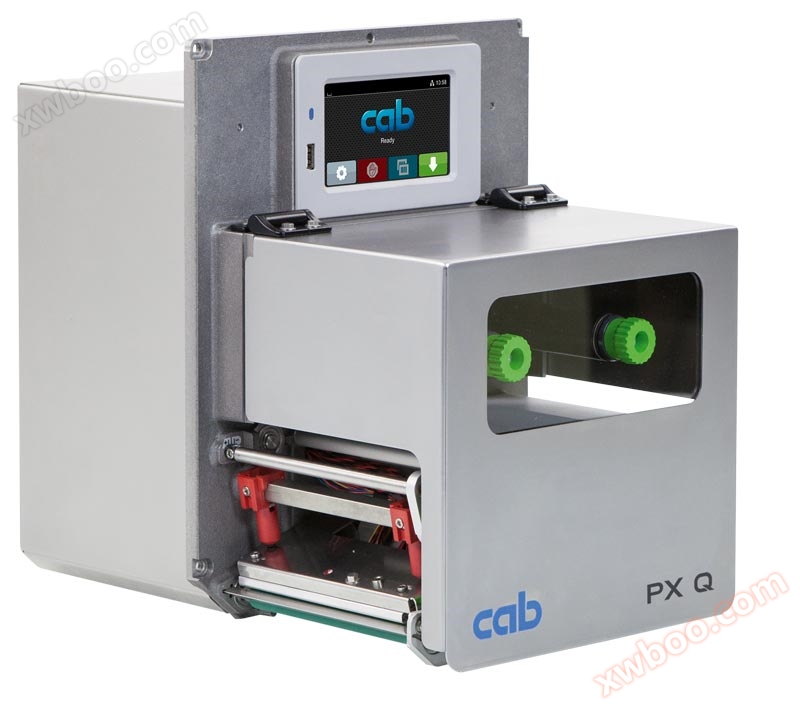
Printing module CAB PX Q4
The fully automatic printing and labeling performance in industrial applications is perfect, highly reliable, easy to operate, and rarely needs to be
Product details
Fully automatic printing and labeling for industrial applications

Perfect performance, high reliability, easy operation, and minimal need to suspend use due to maintenance! The PX Q printing and peeling module is designed specifically for fully automatic printing and labeling in industrial applications. The PX Q series can be integrated with any assembly position and can also handle complex labeling tasks.
All printing mechanisms are securely assembled within a deformable cast aluminum casing. The food safety grade coating and stainless steel shell make the excellent appearance of the PX Q printing module perfectly matched with outstanding functions. The PX Q series printing engine is compatible with the fixed screw hole positions of other brands of machines.
Multiple application models
Industrial application models for precise printing


paper feed direction
All printing modules provide left and right paper output versions. When using PX Q4, printing resolutions of 300 and 600 dpi can be selected. PX Q4.3 and PX Q6.3 offer options of 203 and 300 dpi.


Technical Details

Technical Details
1. Operation panel
Intuitive and simple operation combined with easy to understand graphics can facilitate adjusting the body settings.
2 Carbon ribbon supply shaft and recycling shaft
The axial three piece tightening design allows for quick and easy replacement of carbon ribbons.
3 sturdy base mechanism
Made of one-piece cast aluminum. All printing mechanisms are securely assembled on the support base.
4 print head column
A pillar is fixed on the inner side; Adjust the other pillar to the edge of the label and position it after confirming that the printing quality is good.
5 print heads
All print heads of the same width can be freely replaced. A few simple steps can replace the print head.
6. Carbon saving belt device (optional)
At the same time as the label is fed, the print head will lift and the ribbon will stop rotating.
7. Remove the printing roller
The simple loading and unloading design facilitates cleaning or replacement of worn printing rollers.
8. Convenient replacement of consumables
Insert the label paper roll and push it to the bottom of the side. The use of a lever can lock the print head and label fixing roller.
9 Label Sensor
Paired with penetrating and reflective sensors to accurately locate the printing position on the label and detect the trailing edge of the label.
10 label return function
After the label is peeled off, the next label will be returned to the back of the print head. This ensures that the front edge of the label can still be printed and prevents residual glue from overflowing due to prolonged waiting. When using sensitive materials, the print head can be lifted to avoid wrinkling of the ribbon.
Printing accuracy
The smaller the label size, the higher the requirement for printing accuracy. By adjusting and correcting, the maximum deviation value of printing can be reduced to ± 0.2 mm.
 Printing icon for labeling operation
 Menu Jump to menu
 Reprint: Repeat printing the last label
 Interrupt and continue printing work
 Stop and delete all printing jobs
 Label feed label feeding

It will switch to landscape or portrait mode depending on the installation direction.

90 ° rotated labeling host

Video tour


Set optionsPrint parameters


control panel
Intuitive and easy to operate, combined with clear and understandable graphics, make it convenient to adjust the body settings
1 LED light display: power on
2 status columns: receive printed data, record data stream, carbon ribbon depletion warning, insert SD memory card/USB flash drive, Bluetooth, WLAN wireless network, Ethernet network, USB Slave transmission interface, time
3 status notifications: standby, pause, number of labels completed per print job, labels that have been peeled off, waiting for external signals
4 USB slots for maintenance use with a USB flash drive or dedicated USB drive, which can upload files to the built-in flash memory of the device.
5 Operations
Printing icon for labeling operationMenu Jump to menuReprint: Repeat printing the last labelInterrupt and continue printing workStop and delete all printing jobsLabel feed label feedingIt will switch to landscape or portrait mode depending on the installation direction.
90 ° rotated labeling host
Video tour
Set optionsPrint parameters
Adjust label printing positioning YSelect printing speed
External operation panel
The function is the same as the operation panel on the labeling host
The display of the screen will switch between horizontal or vertical orientation.
You can choose to use an external operation panel or the built-in operation panel of the labeling host according to your needs.
Labeling host port: USB 2.0 high-speed device

1 LED light display: power on
2 USB slots for maintenance use with a USB flash drive or dedicated USB drive, which can upload files to the built-in flash memory of the device.
3 USB transmission cables, length 1.8 to 16 meters
If the length exceeds 3 meters, only the specified transmission line can be used; Please refer to the installation instructions for specifications and dimensions
Specification data

1. Smaller, thinner materials or highly adhesive labels may have limitations. Key applications must be tested in advance.
2. The width of the carbon ribbon should be approximately the same as the label to avoid wrinkling.
Online inquiry
-
Contacts
-
Company
-
Telephone
-
Email
-
WeChat
-
Verification Code
-
Message Content
-