
VIP member
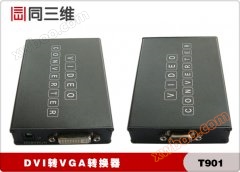
DVI-D to VGA converter (same as 3D T901)
1、 Product Introduction: The T901DVI-D to VGA Converter is a device that can convert a DVI-D signal into a VGA analog signal. The input signal support
Product details
1、 Product Introduction:
The T901 DVI-D to VGA converter is a device that can convert a DVI-D signal into a VGA analog signal. The input signal supports devices such as computers, consoles, and matrices. The input can also use the DVI-I interface (only supports DVI-D signals), and the output can use the D-Sub interface, which is very suitable for new or existing command and dispatch systems such as banks, transportation, aviation, ports, electricity, security, civil defense, video conferencing, online teaching broadcasting, LED large screen display systems, etc. Plug and play function, no need to install any driver software, easy to use. (Note: This device performs point-to-point conversion, and the resolution varies with the input DVI signal).
DVI-D (D=Digital) is a pure digital signal interface that can only connect signals from the DVI-D interface.
DVI-I: The 4-pin next to the digital+analog DVI-I. interface is the analog signal converted from RAMDAC. When DVI-Iis connected to DVI-D, it only functions as a DVI-D.

2、 Parameter description:
① One DVI-D digital signal input;
② One VGA (RGB) signal output;
③ VGA(PC) 输出分辨率: 640* 480@60Hz 、800* 600@60Hz 、1024* 768@60Hz 、1280* 720@60Hz 、1280* 768@60Hz 、1280* 800@60Hz 、1280* 1024@60Hz 、1360* 768@60Hz 、1600* 1200@60Hz 、1920* 1080@60Hz
④ LED indicator light, when the signal source or signal terminal is in working state, the corresponding indicator light will be on.
⑤ Working power specifications: AC input (50/60HZ) --100V-240V, DC output: DC 5V/1A
⑥ Product size: 110 * 75 * 22mm
⑦ Product weight: 180g
3、 Operation steps:
① DVI cable connected to DVI input, VGA cable connected to VGA output
② Connect the power adapter to the DC port of the product (note: the output voltage must be 5V, too high will damage the product)
③ After the product works normally, the corresponding indicator light of the port lights up.

4、 Interface Description:
DV5V connected to DC5V/1A power adapter
RUN working indicator light
DVI-IN connected to DVI signal source
VGA-OUT connected to VGA display device
5、 Common problems:
1. Does the DVI to VGA converter not work?
The first step is to check if the power indicator light is on. If it is not on, please check the power section.
The second step is to check whether the wire is loose or has poor contact.
If it still cannot be displayed, please directly connect the input signal to the TV or display device to see if it can be displayed normally.
2. The working indicator light on the display end is on but no image is displayed?
Please check if the input and output resolutions correspond.
Product inquiry hotline:.
Product Application
Widely used in various high-definition video engineering projects, it is very suitable for new or existing command and dispatch systems such as banks, transportation, aviation, docks, electricity, security, civil defense, etc., as well as video conferencing, online teaching broadcasting, LED large screen display systems, etc. Product inquiry hotline:.
Online inquiry
-
Contacts
-
Company
-
Telephone
-
Email
-
WeChat
-
Verification Code
-
Message Content
-